
 doc2.0
Processor Acquirer restrictions
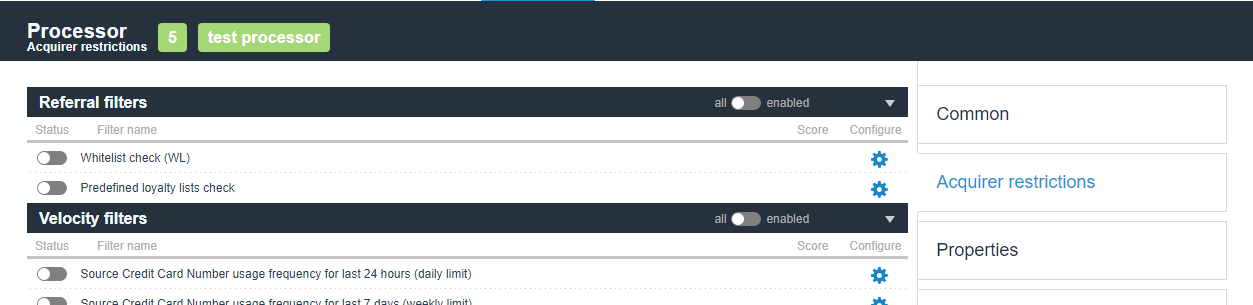
This functionality allows to prevent non-successful processing of transactions on all gates of the same processor which have specific limitations. To switch them on, go to the required processor and click on the “Acquirer restrictions” tab. Tab will be available only for manager account and linked superiors.
Restriction Name |
Comment |
UI code and reason |
|---|---|---|
Whitelist check (WL)
|
Allows ignoring all other Acquirer restrictions for selected Source credit card numbers and Device fingerprints. Sometimes customer’s behavior can lead to the unfortunate situation where a shopper is completely unable to process transactions. You can whitelist a customer’s data so they can successfully process their transaction. White list could be specified for the exact Source card number by manager and the exact Device fingerprint by manager.
|
|
Predefined loyalty lists check
|
Allows processing for trusted customers only. Different acquirers have different definitions of a trusted customer, this filter allows processing for customers with emails, source/destination card or purpose in corresponding loyalty lists only. Transactions for customers that are not listed in any loyalty list will be filtered out.
|
18042
18043
18110
18111
|
Destination Credit Card type check
|
This referral list allows to block transactions processing for selected Destination Credit Card types (Business, Corporate, etc.)
|
18112
|
Source Credit Card type check
|
This referral list allows to block transactions processing for selected Source Credit Card types (Business, Corporate, etc.)
|
18113
|
Source Credit Card external check
|
This verification process enables external inquiries to confirm if the source credit card is available for deposits
|
18114
|
Destination Credit Card external check
|
This verification process enables external inquiries to confirm if the destination credit card is available for withdrawals
|
18115
|
Check client approve count for merchant
|
This check fires when the number of transactions associated with exact client for that merchant does not reach the configured thresholds. The client can be identified by card or email address. Counts Sale, Preauth or Transfer transactions in the approved status.
|
18116
|
Check client approve count for manager
|
This check fires when the number of transactions associated with exact client for that manager does not reach the configured thresholds. The client can be identified by card or email address. Counts Sale, Preauth or Transfer transactions in the approved status.
|
18117
|
Customer name differs from Cardholder name
|
This check fires when the provided customer name does not match cardholder name.
|
18120
|
Customer billing address Country differs from Issuing Country
|
This risk check is triggered when a transaction has the customer billing address country different from the issuing country of the card.
|
18121
|
Processor lockout by specified declines
|
The filter allows locking out a Processor for Lockout period of time based on the defined Limit of declined transactions with the specific Analyzed decline codes occured for the Analyzed period of time.
|
19100
|
Billing Country blacklist
|
The filter allows blocking chosen countries
|
19104
|
Check client approve date for manager
|
This check fires if the client’s date since their first approved transaction is below the required number of days. The client will be identified by client definition set on endpoint/project level where endpoint overrides project setting. Counts Preauth, Sale, Transfer, Payout transactions in the approved status.
|
19103
|
Source Credit Card Number usage frequency for last 24 hours (daily limit)
|
This check fires when the number or amount of transactions associated with exact Source credit card number exceeds the configured thresholds. The time threshold is a 24 hours window calculated backwards from the moment of the transaction. For window calculation all transaction dates are truncated to hours. The risk fires on the transaction after the set threshold. So, if you set a threshold of 10 transactions, it fires on the 11th transaction in 24 hours. Counts Sale, Preauth or Transfer transactions in the approved status. Timeframe can be set to calendar day instead of 24 hours window.
|
18004 - Approved hourly amount limit reached
18005 - Approved hourly quantity limit reached
|
Source Credit Card Number usage frequency for last 7 days (weekly limit)
|
This check fires when the number or amount of transactions associated with exact Source credit card number exceeds the configured thresholds. The time threshold is a 7 days window calculated backwards from the moment of the transaction. For window calculation all transaction dates are truncated to hours. The risk fires on the transaction after the set threshold. So, if you set a threshold of 10 transactions, it fires on the 11th transaction in 168 hours. Counts Sale, Preauth or Transfer transactions in the approved status.
|
18002 - Approved weekly amount limit reached
18003 - Approved weekly quantity limit reached
|
Source Credit Card Number usage frequency for last month (monthly limit)
|
This check fires when the number or amount of transactions associated with exact Source credit card number exceeds the configured thresholds. The time threshold is a one month window calculated backwards from the moment of the transaction. For window calculation all transaction dates are truncated to days. The risk fires on the transaction after the set threshold. So, if you set a threshold of 10 transactions, it fires on the 11th transaction in one month. Month calculation based on calendar i.e. 28th, 29th, 30th and 31st of March would be bumped to 28th of February during window calculation. Counts Sale, Preauth or Transfer transactions in the approved status.
|
18000 - Approved monthly amount limit reached
18001 - Approved monthly quantity limit reached
|
Destination Credit Card Number usage frequency for last 24 hours (daily limit)
|
This check fires when the number or amount of transactions associated with exact Destination credit card number exceeds the configured thresholds. The time threshold is a 24 hours window calculated backwards from the moment of the transaction. For window calculation all transaction dates are truncated to hours. The risk fires on the transaction after the set threshold. So, if you set a threshold of 10 transactions, it fires on the 11th transaction in 24 hours. Counts Transfer transactions only in the approved status.
|
18032 - Destination approved hourly amount limit reached
18033 - Destination approved hourly quantity limit reached
|
Destination Credit Card Number usage frequency for last 7 days (weekly limit)
|
This check fires when the number or amount of transactions associated with exact Destination credit card number exceeds the configured thresholds. The time threshold is a 7 days window calculated backwards from the moment of the transaction. For window calculation all transaction dates are truncated to hours. The risk fires on the transaction after the set threshold. So, if you set a threshold of 10 transactions, it fires on the 11th transaction in 168 hours. Counts Transfer transactions only in the approved status.
|
18030 - Destination approved weekly amount limit reached
18031 - Destination approved weekly quantity limit reached
|
Destination Credit Card Number usage frequency for last month (monthly limit)
|
This check fires when the number or amount of transactions associated with exact Destination credit card number exceeds the configured thresholds. The time threshold is a one month window calculated backwards from the moment of the transaction. For window calculation all transaction dates are truncated to days. The risk fires on the transaction after the set threshold. So, if you set a threshold of 10 transactions, it fires on the 11th transaction in one month. Month calculation based on calendar i.e. 28th, 29th, 30th and 31st of March would be bumped to 28th of February during window calculation. Counts Transfer transactions only in the approved status.
|
18028 - Destination approved monthly amount limit reached
18029 - Destination approved monthly quantity limit reached
|
Total Credit Card Number usage frequency for last 24 hours (daily limit)
|
This check fires when the number or amount of transactions associated with exact credit card number used as Source or Destination exceeds the configured thresholds. The time threshold is a 24 hours window calculated backwards from the moment of the transaction. For window calculation all transaction dates are truncated to hours. The risk fires on the transaction after the set threshold. So, if you set a threshold of 10 transactions, it fires on the 11th transaction in 24 hours. Counts Sale, Preauth or Transfer transactions in the approved status.
|
18038 - Total approved hourly amount limit reached
18039 - Total approved hourly quantity limit reached
|
Total Credit Card Number usage frequency for last 7 days (weekly limit)
|
This check fires when the number or amount of transactions associated with exact credit card number used as Source or Destination exceeds the configured thresholds. The time threshold is a 7 days window calculated backwards from the moment of the transaction. For window calculation all transaction dates are truncated to hours. The risk fires on the transaction after the set threshold. So, if you set a threshold of 10 transactions, it fires on the 11th transaction in 168 hours. Counts Sale, Preauth or Transfer transactions in the approved status.
|
18036 - Total approved weekly amount limit reached
18037 - Total approved weekly quantity limit reached
|
Total Credit Card Number usage frequency for last month (monthly limit)
|
This check fires when the number or amount of transactions associated with exact credit card number used as Source or Destination exceeds the configured thresholds. The time threshold is a one month window calculated backwards from the moment of the transaction. For window calculation all transaction dates are truncated to days. The risk fires on the transaction after the set threshold. So, if you set a threshold of 10 transactions, it fires on the 11th transaction in one month. Month calculation based on calendar i.e. 28th, 29th, 30th and 31st of March would be bumped to 28th of February during window calculation. Counts Sale, Preauth or Transfer transactions in the approved status.
|
18034 - Total approved monthly amount limit reached
18035 - Total approved monthly quantity limit reached
|
Email usage frequency for last 24 hours (daily limit)
|
This check fires when the number or amount of transactions associated with exact Email address exceeds the configured thresholds. The time threshold is a 24 hours window calculated backwards from the moment of the transaction. For window calculation all transaction dates are truncated to hours. The risk fires on the transaction after the set threshold. So, if you set a threshold of 10 transactions, it fires on the 11th transaction in 24 hours. Counts Sale, Preauth or Transfer transactions in the approved status.
|
18010 - E-mail approved hourly amount limit reached
18011 - E-mail approved hourly quantity limit reached
|
Email usage frequency for last 7 days (weekly limit)
|
This check fires when the number or amount of transactions associated with exact Email address exceeds the configured thresholds. The time threshold is a 7 days window calculated backwards from the moment of the transaction. For window calculation all transaction dates are truncated to hours. The risk fires on the transaction after the set threshold. So, if you set a threshold of 10 transactions, it fires on the 11th transaction in 168 hours. Counts Sale, Preauth or Transfer transactions in the approved status.
|
18008 - E-mail approved weekly amount limit reached
18009 - E-mail approved weekly quantity limit reached
|
Email usage frequency for last month (monthly limit)
|
This check fires when the number or amount of transactions associated with exact Email address exceeds the configured thresholds. The time threshold is a one month window calculated backwards from the moment of the transaction. For window calculation all transaction dates are truncated to days. The risk fires on the transaction after the set threshold. So, if you set a threshold of 10 transactions, it fires on the 11th transaction in one month. Month calculation based on calendar i.e. 28th, 29th, 30th and 31st of March would be bumped to 28th of February during window calculation. Counts Sale, Preauth or Transfer transactions in the approved status.
|
18006 - E-mail approved monthly amount limit reached
18007 - E-mail approved monthly quantity limit reached
|
Email usage lifetime
|
Allows to limit the number and amount of transactions available to an individual customer and set a limit on the processor for the ALL time of existence. Customer is determined by E-Mail. This check fires when the number or amount of transactions associated with exact Email address exceeds the configured thresholds. The time period is lifetime. The risk fires on the transaction after the set threshold. So, if you set a threshold of 10 transactions, it fires on the 11th transaction. Counts Sale, Preauth or Transfer transactions in the approved status.
|
18048 - E-mail approved lifetime amount limit reached
18049 - E-mail approved lifetime quantity limit reached
|
Customer IP usage frequency for last 24 hours (daily limit)
|
This check fires when the number or amount of transactions associated with exact Customer IP address exceeds the configured thresholds. The time threshold is a 24 hours window calculated backwards from the moment of the transaction. For window calculation all transaction dates are truncated to hours. The risk fires on the transaction after the set threshold. So, if you set a threshold of 10 transactions, it fires on the 11th transaction in 24 hours. Counts Sale, Preauth or Transfer transactions in the approved status.
|
18022 - Customer IP approved hourly amount limit reached
18023 - Customer IP approved hourly quantity limit reached
|
Customer IP usage frequency for last 7 days (weekly limit)
|
This check fires when the number or amount of transactions associated with exact Customer IP address exceeds the configured thresholds. The time threshold is a 7 days window calculated backwards from the moment of the transaction. For window calculation all transaction dates are truncated to hours. The risk fires on the transaction after the set threshold. So, if you set a threshold of 10 transactions, it fires on the 11th transaction in 168 hours. Counts Sale, Preauth or Transfer transactions in the approved status.
|
18020 - Customer IP approved weekly amount limit reached
18021 - Customer IP approved weekly quantity limit reached
|
Customer IP usage frequency for last month (monthly limit)
|
This check fires when the number or amount of transactions associated with exact Customer IP address exceeds the configured thresholds. The time threshold is a one month window calculated backwards from the moment of the transaction. For window calculation all transaction dates are truncated to days. The risk fires on the transaction after the set threshold. So, if you set a threshold of 10 transactions, it fires on the 11th transaction in one month. Month calculation based on calendar i.e. 28th, 29th, 30th and 31st of March would be bumped to 28th of February during window calculation. Counts Sale, Preauth or Transfer transactions in the approved status.
|
18018 - Customer IP approved monthly amount limit reached
18019 - Customer IP approved monthly quantity limit reached
|
Purpose usage frequency for last 24 hours (daily limit)
|
This check fires when the number or amount of transactions associated with exact Purpose exceeds the configured thresholds. The time threshold is a 24 hours window calculated backwards from the moment of the transaction. For window calculation all transaction dates are truncated to hours. The risk fires on the transaction after the set threshold. So, if you set a threshold of 10 transactions, it fires on the 11th transaction in 24 hours. Counts Sale, Preauth or Transfer transactions in the approved status.
|
18016 - Purpose approved hourly amount limit reached
18017 - Purpose approved hourly quantity limit reached
|
Purpose usage frequency for last 7 days (weekly limit)
|
This check fires when the number or amount of transactions associated with exact Purpose exceeds the configured thresholds. The time threshold is a 7 days window calculated backwards from the moment of the transaction. For window calculation all transaction dates are truncated to hours. The risk fires on the transaction after the set threshold. So, if you set a threshold of 10 transactions, it fires on the 11th transaction in 168 hours. Counts Sale, Preauth or Transfer transactions in the approved status.
|
18014 - Purpose approved weekly amount limit reached
18015 - Purpose approved weekly quantity limit reached
|
Purpose usage frequency for last month (monthly limit)
|
This check fires when the number or amount of transactions associated with exact Purpose exceeds the configured thresholds. The time threshold is a one month window calculated backwards from the moment of the transaction. For window calculation all transaction dates are truncated to days. The risk fires on the transaction after the set threshold. So, if you set a threshold of 10 transactions, it fires on the 11th transaction in one month. Month calculation based on calendar i.e. 28th, 29th, 30th and 31st of March would be bumped to 28th of February during window calculation. Counts Sale, Preauth or Transfer transactions in the approved status.
|
18012 - Purpose approved monthly amount limit reached
18013 - Purpose approved monthly quantity limit reached
|
Preventing transaction with the same amount
|
This check fires when more than one transaction is made with same amount in a time threshold (in seconds). The maximum time threshold is a 300 seconds window, calculated backwards from the moment of the first transaction. The risk fires on the second transaction with the same amount during set time threshold. Counts Sale, Preauth, Payouts or Transfer transactions.
|
18052 - Same amount request on processor
|
Issuer country usage frequency
|
This check fires when the number of transactions associated with the same card issuer country exceeds the configured thresholds. The maximum time threshold is a 300 seconds window, calculated backwards from the moment of the first transaction. The risk fires on the transaction after the set threshold. So, if you set a threshold of 10 transactions, it fires on the 11th transaction in 300 seconds. Counts Sale, Preauth, Payouts or Transfer transactions.
|
18053 - Transactions quantity limit exceeds by country on processor
|
BIN range usage frequency
|
This check fires when the number of transactions associated with the specific card BIN range exceeds the configured thresholds, also can specify a list of card BIN range exceptions for which checks will not be performed. The maximum time threshold is a 300 seconds window, calculated backwards from the moment of the first transaction. The risk fires on the transaction after the set threshold. So, if you set a threshold of 10 transactions, it fires on the 11th transaction in 300 seconds. Counts Sale, Preauth, Payouts or Transfer transactions.
|
18056 - Transaction quantity limit exceeds by BIN range on processor
|
Transaction number per period
|
This check fires when the number of transactions exceeds the configured thresholds. The maximum time threshold is a 600 seconds window, calculated backwards from the moment of the first transaction. The risk fires on the transaction after the set threshold. So, if you set a threshold of 10 transactions, it fires on the 11th transaction during 600 seconds. Counts Sale, Preauth, Payouts or Transfer transactions.
|
18057 - Detected transaction in the set threshold of time
|
Source Credit Card Number decline frequency for last 24 hours (daily decline limit)
|
This check fires when the number or amount of declined transactions associated with exact Source credit card number exceeds the configured thresholds. The time threshold is a 24 hours window calculated backwards from the moment of the transaction. For window calculation all transaction dates are truncated to hours. The risk fires on the transaction after the set threshold. So, if you set a threshold of 10 transactions, it fires on the 11th transaction in 24 hours. Counts Account verification, Sale, Preauth or Transfer transactions in the Declined status.
|
18054 - Daily decline quantity limit exceeded for the same credit card number on processor
18055 - Daily decline amount limit exceeded for the same credit card number on processor
|
Source Credit Card Number decline frequency for last 7 days (decline weekly limit)
|
This check fires when the number of declined transactions associated with exact Source credit card number exceeds the configured thresholds. The time threshold is a 7 days window calculated backwards from the moment of the transaction. For window calculation all transaction dates are truncated to hours. The risk fires on the transaction after the set threshold. So, if you set a threshold of 10 transactions, it fires on the 11th transaction in 168 hours. Counts Sale, Preauth or Transfer transactions in declined status.
|
18058 - Weekly decline quantity limit exceeded for the same credit card number on processor
18059 - Weekly decline amount limit exceeded for the same credit card number on processor
|
Source Credit Card Number decline frequency for last month (decline monthly limit)
|
This check fires when the number of declined transactions associated with exact Source credit card number exceeds the configured thresholds. The time threshold is a 7 days window calculated backwards from the moment of the transaction. For window calculation all transaction dates are truncated to days. The risk fires on the transaction after the set threshold. So, if you set a threshold of 10 transactions, it fires on the 11th transaction in one month. Month calculation based on calendar i.e. 28th, 29th, 30th and 31st of March would be bumped to 28th of February during window calculation. Counts Sale, Preauth or Transfer transactions in the approved status.
|
18060 - Monthly decline quantity limit exceeded for the same credit card number on processor
18061 - Monthly decline amount limit exceeded for the same credit card number on processor
|
Account Number usage frequency for last 24 hours (daily limit)
|
This check fires when the number or amount of transactions associated with exact Account number exceeds the configured thresholds. The time threshold is a 24 hours window calculated backwards from the moment of the transaction. For window calculation all transaction dates are truncated to hours. The risk fires on the transaction after the set threshold. So, if you set a threshold of 10 transactions, it fires on the 11th transaction in 24 hours. Counts Sale, Preauth, Payout or Transfer transactions in the approved status.
|
18062
18063
|
Account Number usage frequency for last 7 days (weekly limit)
|
This check fires when the number or amount of transactions associated with exact Account number exceeds the configured thresholds. The time threshold is a 7 days window calculated backwards from the moment of the transaction. For window calculation all transaction dates are truncated to hours. The risk fires on the transaction after the set threshold. So, if you set a threshold of 10 transactions, it fires on the 11th transaction in 168 hours. Counts Sale, Preauth, Payout or Transfer transactions in the approved status.
|
18064
18065
|
Account Number usage frequency for last month (monthly limit)
|
This check fires when the number or amount of transactions associated with exact Account number exceeds the configured thresholds. The time threshold is a one month window calculated backwards from the moment of the transaction. For window calculation all transaction dates are truncated to days. The risk fires on the transaction after the set threshold. So, if you set a threshold of 10 transactions, it fires on the 11th transaction in one month. Month calculation based on calendar i.e. 28th, 29th, 30th and 31st of March would be bumped to 28th of February during window calculation. Counts Sale, Preauth, Payout or Transfer transactions in the approved status.
|
18066
18067
|
Destination Credit Card Number decline frequency for last 24 hours (daily decline limit)
|
This check fires when the number or amount of declined transactions associated with exact Destination credit card number exceeds the configured thresholds. The time threshold is a 24 hours window calculated backwards from the moment of the transaction. For window calculation all transaction dates are truncated to hours. The risk fires on the transaction after the set threshold. So, if you set a threshold of 10 transactions, it fires on the 11th transaction in 24 hours. Counts Transfer transactions in the Declined status.
|
18068 - Daily decline amount limit exceeded for the recipient on processor
18069 - Daily decline quantity limit exceeded for the recipient on processor
|
Destination Credit Card Number decline frequency for last week (weekly decline limit)
|
This check fires when the number or amount of declined transactions associated with exact Destination credit card number exceeds the configured thresholds. The time threshold is a 7 days window calculated backwards from the moment of the transaction. For window calculation all transaction dates are truncated to days. The risk fires on the transaction after the set threshold. So, if you set a threshold of 10 transactions, it fires on the 11th transaction in 168 hours. Counts Transfer transactions in the Declined status.
|
18070 - Weekly decline amount limit exceeded for the recipient on processor
18071 - Weekly decline quantity limit exceeded for the recipient on processor
|
Destination Credit Card Number decline frequency for last month (monthly decline limit)
|
This check fires when the number or amount of declined transactions associated with exact Destination credit card number exceeds the configured thresholds. The time threshold is a one month window calculated backwards from the moment of the transaction. For window calculation all transaction dates are truncated to days. The risk fires on the transaction after the set threshold. So, if you set a threshold of 10 transactions, it fires on the 11th transaction in one month. Month calculation based on calendar i.e. 28th, 29th, 30th and 31st of March would be bumped to 28th of February during window calculation. Counts Transfer transactions in the Declined status.
|
18072 - Monthly decline amount limit exceeded for the recipient on processor
18073 - Monthly decline quantity limit exceeded for the recipient on processor
|
Total Credit Card Number decline frequency for last 24 hours (daily decline limit)
|
This check fires when the number or amount of declined transactions associated with exact Source or Destination credit card number exceeds the configured thresholds. The time threshold is a 24 hours window calculated backwards from the moment of the transaction. For window calculation all transaction dates are truncated to hours. The risk fires on the transaction after the set threshold. So, if you set a threshold of 10 transactions, it fires on the 11th transaction in 24 hours. Counts Account verification, Sale, Preauth or Transfer transactions in the Declined status.
|
18074 - Daily decline total amount limit exceeded for the sender on processor
18075 - Daily decline total quantity limit exceeded for the sender on processor
18076 - Daily decline total amount limit exceeded for the recipient on processor
18077 - Daily decline total quantity limit exceeded for the recipient on processor
|
Total Credit Card Number decline frequency for last week (weekly decline limit)
|
This check fires when the number or amount of declined transactions associated with exact Source or Destination credit card number exceeds the configured thresholds. The time threshold is a 7 days window calculated backwards from the moment of the transaction. For window calculation all transaction dates are truncated to days. The risk fires on the transaction after the set threshold. So, if you set a threshold of 10 transactions, it fires on the 11th transaction in 168 hours. Counts Account verification, Sale, Preauth or Transfer transactions in the Declined status.
|
18078 - Weekly decline total amount limit exceeded for the sender on processor
18079 - Weekly decline total quantity limit exceeded for the sender on processor
18080 - Weekly decline total amount limit exceeded for the recipient on processor
18081 - Weekly decline total quantity limit exceeded for the recipient on processor
|
Total Credit Card Number decline frequency for last month (monthly decline limit)
|
This check fires when the number or amount of declined transactions associated with exact Source or Destination credit card number exceeds the configured thresholds. The time threshold is a one month window calculated backwards from the moment of the transaction. For window calculation all transaction dates are truncated to days. The risk fires on the transaction after the set threshold. So, if you set a threshold of 10 transactions, it fires on the 11th transaction in one month. Month calculation based on calendar i.e. 28th, 29th, 30th and 31st of March would be bumped to 28th of February during window calculation. Counts Account verification, Sale, Preauth or Transfer transactions in the Declined status.
|
18082 - Monthly decline total amount limit exceeded for the sender on processor
18083 - Monthly decline total quantity limit exceeded for the sender on processor
18084 - Monthly decline total amount limit exceeded for the recipient on processor
18085 - Monthly decline total quantity limit exceeded for the recipient on processor
|
Source Credit Card Number usage frequency for last N days
|
This check fires when the number or amount of transactions associated with exact Source credit card number exceeds the configured thresholds. The time threshold is a N days window calculated backwards from the moment of the transaction. The N parameter (date period) can be set from 1 to 30. For window calculation all transaction dates are truncated to days. The risk fires on the transaction after the set threshold. So, if you set a threshold of 10 transactions, it fires on the 11th transaction in N days. Counts Sale, Preauth or Transfer transactions in the approved status.
|
18086 - Approved specified period amount limit reached
18087 - Approved specified period quantity limit reached
|
Destination Credit Card Number usage frequency for last N days
|
This check fires when the number or amount of transactions associated with exact Destination credit card number exceeds the configured thresholds. The time threshold is a N days window calculated backwards from the moment of the transaction. The N parameter (date period) can be set from 1 to 30. For window calculation all transaction dates are truncated to days. The risk fires on the transaction after the set threshold. So, if you set a threshold of 10 transactions, it fires on the 11th transaction in N days. Counts Transfer transactions in the approved status.
|
18088 - Approved specified period amount limit reached,
18089 - Approved specified period quantity limit reached
|
Total Credit Card Number usage frequency for last N days
|
This check fires when the number or amount of transactions associated with exact Source or Destination credit card number exceeds the configured thresholds. The time threshold is a N days window calculated backwards from the moment of the transaction. The N parameter (date period) can be set from 1 to 30. For window calculation all transaction dates are truncated to days. The risk fires on the transaction after the set threshold. So, if you set a threshold of 10 transactions, it fires on the 11th transaction in N days. Counts Sale, Preauth or Transfer transactions in the approved status.
|
18090 - Total specified period amount limit reached
18091 - Total specified period quantity limit reached
18092 - Total specified period amount limit reached for recipient
18093 - Total specified period quantity limit reached for recipient
|
Purpose usage frequency for last N days
|
This check fires when the number or amount of transactions associated with exact Purpose exceeds the configured thresholds. The time threshold is a N days window calculated backwards from the moment of the transaction. The N parameter (date period) can be set from 1 to 30. For window calculation all transaction dates are truncated to days. The risk fires on the transaction after the set threshold. So, if you set a threshold of 10 transactions, it fires on the 11th transaction in N days. Counts Sale, Preauth or Transfer transactions in the approved status.
|
18094 - Purpose approved specified period amount limit reached
18095 - Purpose approved specified period quantity limit reached
|
Email usage frequency for last N days
|
This check fires when the number or amount of transactions associated with exact Email address exceeds the configured thresholds. The time threshold is a N days window calculated backwards from the moment of the transaction. The N parameter (date period) can be set from 1 to 30. For window calculation all transaction dates are truncated to days. The risk fires on the transaction after the set threshold. So, if you set a threshold of 10 transactions, it fires on the 11th transaction in N days. Counts Sale, Preauth or Transfer transactions in the approved status.
|
18096 - E-mail approved specified period amount limit reached
18097 - E-mail approved specified period quantity limit reached
|
IP address usage frequency for last N days
|
This check fires when the number or amount of transactions associated with exact IP address exceeds the configured thresholds. The time threshold is a N days window calculated backwards from the moment of the transaction. The N parameter (date period) can be set from 1 to 30. For window calculation all transaction dates are truncated to days. The risk fires on the transaction after the set threshold. So, if you set a threshold of 10 transactions, it fires on the 11th transaction in N days. Counts Sale, Preauth or Transfer transactions in the approved status.
|
18098 - IP address approved specified period amount limit reached
18099 - IP address approved specified period quantity limit reached
|
Fingerprint usage frequency for last N days
|
This check fires when the number or amount of transactions associated with exact Fingerprint exceeds the configured thresholds. The time threshold is a N days window calculated backwards from the moment of the transaction. The N parameter (date period) can be set from 1 to 30. For window calculation all transaction dates are truncated to days. The risk fires on the transaction after the set threshold. So, if you set a threshold of 10 transactions, it fires on the 11th transaction in N days. Counts Sale, Preauth or Transfer transactions in the approved status.
|
18100 - Fingerprint approved specified period amount limit reached,
18101 - Fingerprint approved specified period quantity limit reached
|
Account Number usage frequency for last N days
|
This check fires when the number or amount of transactions associated with exact Account Number exceeds the configured thresholds. The time threshold is a N days window calculated backwards from the moment of the transaction. The N parameter (date period) can be set from 1 to 30. For window calculation all transaction dates are truncated to days. The risk fires on the transaction after the set threshold. So, if you set a threshold of 10 transactions, it fires on the 11th transaction in N days. Counts Sale, Preauth or Transfer transactions in the approved status.
|
18102 - Specified period amount limit exceeded for account number on processor
18103 - Specified period quantity limit exceeded for account number on processor
|
Declined Email usage frequency for last 24 hours (decline daily limit)
|
This check fires when the number or amount of transactions associated with exact Email address exceeds the configured thresholds. The time threshold is a 24 hours window calculated backwards from the moment of the transaction. For window calculation all transaction dates are truncated to hours. The risk fires on the transaction after the set threshold. So, if you set a threshold of 10 transactions, it fires on the 11th transaction in 24 hours. Counts Sale, Preauth or Transfer transactions in declined status.
|
19101 - E-mail decline hourly amount limit reached
19102 - E-mail decline hourly quantity limit reached
|
Below is the example of configuration for “Email usage frequency for last month (monthly limit)” restriction. To switch this restriction on, click on the toggle button near it’s name:
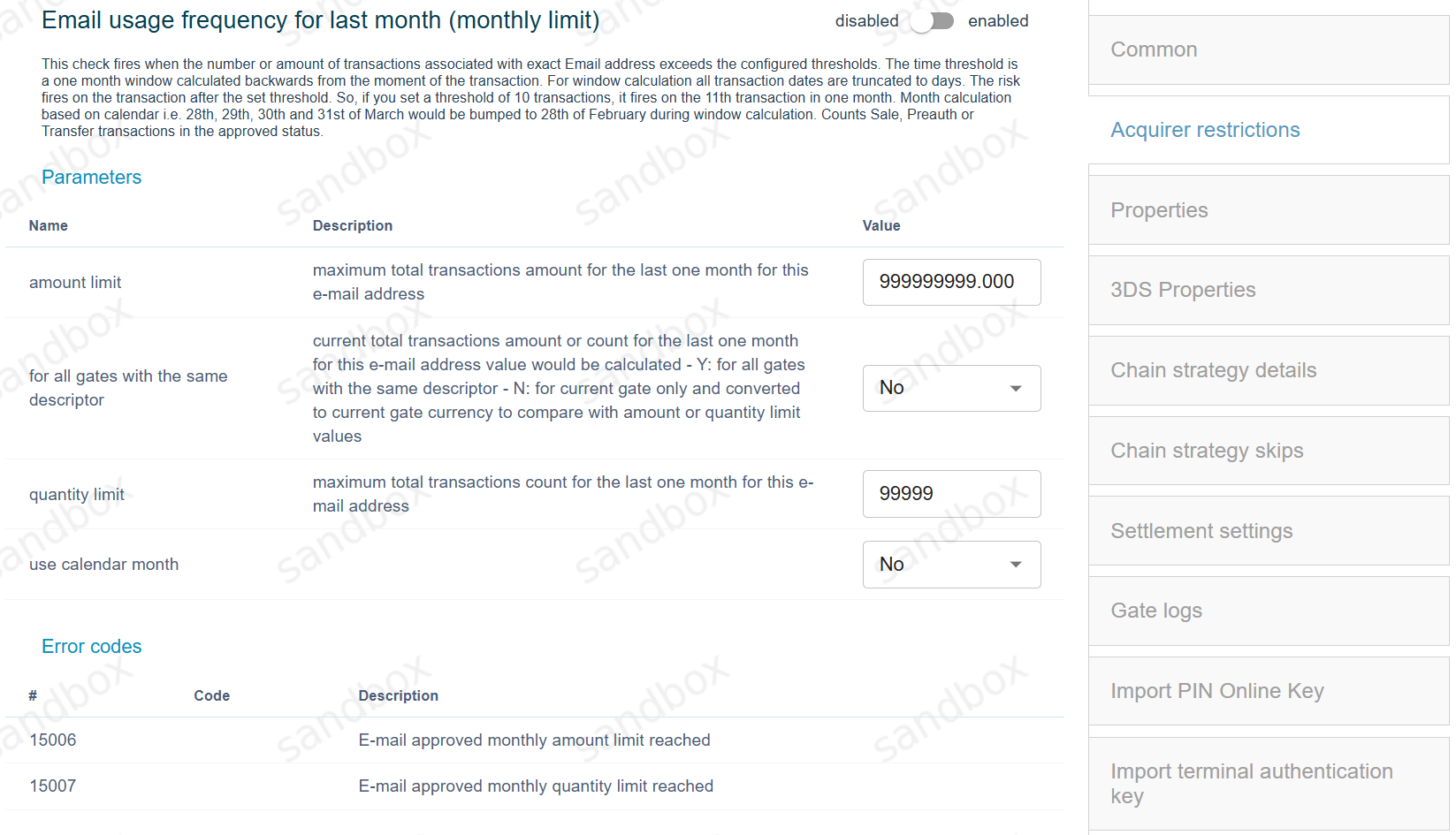
This restriction supports the following settings:
The Amount limit maximum total transactions amount for the last one month for this e-mail address. Value: total amount value.
For all gates with the same descriptor – current total transactions amount or count for the last one month for this e-mail address value would be calculated and converted to current gate currency to compare with amount or quantity limit. Specify the value “Y” (Yes) instead of “N” (No) to enable. Values: Y: for all gates with the same descriptor, N: for current gate only.
The quantity limit parameter specifies the transactions quantity limits. Value: total quantity value.
Use calendar month : Value: Y/N.
The choice of “Country Identifier” will be available in the “Deny” restriction configurations.
Each country is assigned its own numerical identifier. The required country can be chosen from the list.